
Their phone, their language,
Your screen, Korean
Guests scan the QR code and the menu opens on their phone in their own language. What they choose becomes one Korean order sheet your staff reads as it is.
- Guests install nothing
- Keep the till you already use
- Nothing changes about how you take payment
Guest screens come in five languages.
- 外部の食べ物の持ち込みはご遠慮ください
- お一人様一品のご注文をお願いします
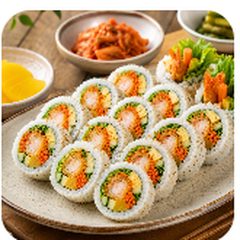
エビロールキンパ
人気
むきエビを巻いた太めのキンパ
₩5,500
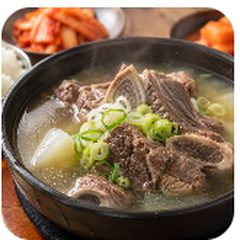
カルビタン
牛肉人気
牛カルビをじっくり煮込んだ澄んだスープ
₩9,000
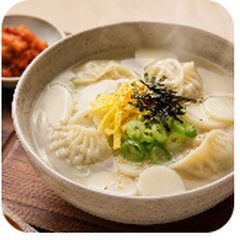
トックマンドゥクク
豚肉人気
お餅と餃子を一緒に煮込みました
₩7,500
Let us start with what we do not do
OneTouch QR stops at telling you, in Korean, what the guest wants. Everything after that stays the way you already do it. It is not a device that puts orders through.
- Open your menu on the guest's phone in their own language
- Turn what they picked into one Korean order sheet
- Mark each item as dine-in or takeaway
- Count how many visits came in through which QR code
- We do not take payment for you
- We do not send anything to other devices in your shop
- We do not touch the till you use today
- We do not collect names, phone numbers or card details
Once the guest holds up the screen, you take it from there exactly as always.
See what the order sheet looks likeThe moment a guest points at a photo
When there was no way to ask whether it was spicy.
When you both passed phones back and forth with a translation app open, and the queue behind grew.
The day you realised “that had pork in it” only after they had left.
This happens because the words do not get through, not because the guest is difficult. OneTouch QR builds one place where they do.
From here the guest does it
All three steps happen in the guest's hands. The only thing you do is put the QR code up once.
The guest scans the QR code
No app to install. It opens right in the phone's browser. If their phone is set to one of our languages, they skip the language screen and land straight on the menu.
They read and choose in their own language
Photos, descriptions, and markings like pork or spicy all appear in their language. The same goes for options.
They hold the screen out to staff
When the guest taps “Show to staff,” the Korean order sheet appears. Before that tap, no Korean summary is shown.
The third step is the heart of this. The basket they browse has no Korean summary in it. The staff-facing screen opens only after the guest taps the button themselves to say they are done choosing.
The order sheet does not change with the language
The guest's phone and the sheet your staff receives. Change the language below. Only the guest's side changes.
Five languages are supported; four of them are shown here.
- 外部の食べ物の持ち込みはご遠慮ください
- お一人様一品のご注文をお願いします
エビロールキンパ
人気
むきエビを巻いた太めのキンパ
₩5,500
カルビタン
牛肉人気
牛カルビをじっくり煮込んだ澄んだスープ
₩9,000
トックマンドゥクク
豚肉人気
お餅と餃子を一緒に煮込みました
₩7,500
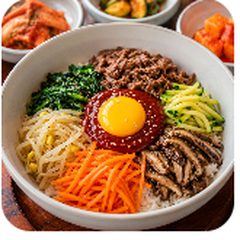
ビビンバ
辛い人気
ナムルとコチュジャンを混ぜてどうぞ
₩8,000
この画面をスタッフに見せてください
새우롤김밥/1개/ 매장
햄추가여부: 햄포함
갈비탕/1개/ 포장
- 합계
- 14,500원
Only the one line of guidance goes out in the guest's language. Items and totals are always Korean.
- The Korean name is saved the moment they choose. So whichever language the guest was reading, the sheet your staff sees is always Korean.
- Dine-in or takeaway is marked per item. Within one order, one dish to eat in and another to take away is written down just like that.
- Options are written in Korean too. Your staff reads straight away what was left out and what was added.
This sheet opens only when the guest taps. The basket screen they see while choosing carries no Korean summary. The staff-facing screen appears only after “Show to staff” is tapped.
You never have to write a word of a foreign language
Write your menu in Korean the way you always have. We handle the rest.
AI drafts it, a person checks it, then it goes up
Register a menu item in Korean and AI prepares foreign-language drafts. Those drafts do not go straight to the guest screen, though.
Written in Korean
The part you do
AI draft translation
Saved as a draft only
A person checks it
Reviewed line by line
Published to guests
Visible to guests from here
Translate everything at once and it is all still a draft. It reaches guests only when someone presses publish on the review screen. A sentence nobody has checked never appears to a guest first.
A missing translation does not fall back to Korean
If an item has no Japanese name yet, only that field is filled with English. The whole screen does not revert to Korean.
- It fills field by field. Even if the name goes out in English, a description that exists in Japanese still shows in Japanese.
- It reads the guest's phone language. If it is one we support, they go straight to the menu with no language screen.
It fits shops with no menu board too
Because we did not attach payment to it, it goes into businesses with no menu board just as well. There are eight business types to pick from today.
- Restaurant
- Café
- Pocha
- Street stall & cart
- Hair salon
- Billiard hall
- Hotel
- Real estate
Filters differ by business
The filters above the guest screen show only what suits that business. Then only the markings that shop's items actually carry are kept.
Restaurant
Café
Filters that do not belong to the business are out, and so are filters with no matching item in that shop.
The words on screen change
A restaurant's wording is not carried over to a hair salon or an estate agency. It shows on the guest side and the admin side, in all five languages.
MenuServiceHair salon
MenuListingReal estate
We do not tell a salon guest to “choose from the menu.” We speak in the words that shop uses.
Add the fields you need yourself
Each business writes down different things. Real estate needs deal type and price; a salon needs how long it takes.
- Add new fields from the operator screen, no development needed.
- Turn off the ones you do not use and they disappear from the screen.
- Turn one back on and the value you had written is still there.
Example fields for a salon service
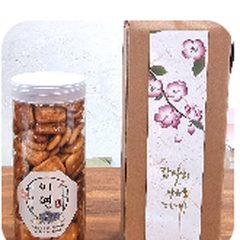 Hangwa gift box18,000 KRW
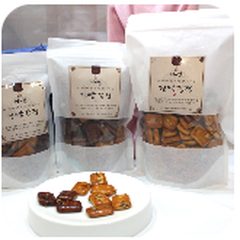 Hangwa assortment12,000 KRW
A traditional hangwa shop gets only one filter
Not a single item here carries pork, beef or spicy markings the way a restaurant's would. So those filters never appear on the guest screen at all.
The greyed-out ones exist for the business type but do not appear, because this shop has no matching items.
You use it yourself, so we kept it plain
The tabs along the bottom of the owner app are three: add a menu item, edit one, and the dashboard. We left the rest out on purpose. Put every feature in and the button you actually reach for gets buried.
Myeongdong Gimbap dashboard
QR visits
198
45 · vs previous 7 days
Order sheets made
47
16 · vs previous 7 days
- Chinese43.9%
- Japanese31.8%
- English20.7%
- Korean3.5%
| Where it is posted | Share of visits | |
|---|---|---|
| Front door | 24.2% | |
| Table | 60.6% | |
| Mirror | 8.6% | |
| Standee | 6.6% |
What would you like to do?
You can see which QR spot gets scanned
Visits, order sheets made, share of visits by language, popular items by language, and orders by time of day are on one screen. How each QR spot performs is here too.
What we watched for 52 days in Myeongdong
Instead of inflating numbers, we wrote down only what actually happened.
94.6%
94.6% of visits
opened in a foreign language
Of 1,341 visits, 1,268 opened in a language other than Korean. That is where preparing the menu in other languages pays off.
One pilot shop in Myeongdong, Seoul, measured over 52 days from 12 July to 1 September 2026. Visits that arrived by address without going through a QR code are not counted in the four spots above.
What to prepare before you start
We left it blank because there is nothing to write. One QR code goes up in the shop, and that is it.
0devices
New hardware to buyNo terminal, no tablet, no printer.
0KRW
To replace your POSThe till you use stays as it is.
0apps
For guests to installScan the QR and it opens in the browser.
Three questions we hear most
Do I have to change my POS?
Keep using it. Payment stays exactly the way you do it now. OneTouch QR only goes as far as telling you, in Korean, what the guest wants.
Does the guest have to install an app?
No. Scanning the QR opens it in the phone browser. Nothing to download, nothing to sign up for.
Do you store guest information?
We do not take names, phone numbers or card details. We use one anonymous number that counts how many visits there were.
Ask us how it would look for your shop
Tell us your business and your situation, and we will build what it would look like for you first.
Someone calls the number you leave and asks about your shop. Then we build the screen that suits your business and show it to you.
Item names and prices written in Korean are enough. You do not need to translate anything.
A hair salon with no menu board and a traditional hangwa shop are already using it. Real estate offices, billiard halls and hotels fit just as well. We will work out together what is worth showing.